

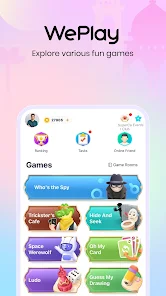
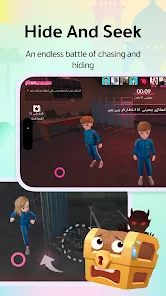
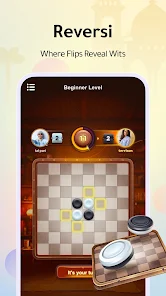
WePlay APK is the Android version of WePlay – Party Game & Chat, a social app where you play quick party games with real people while talking to them by voice. Instead of playing alone against a computer, you join a room, chat with other players and try to find the spy, catch the werewolf, sing a song or guess a drawing. It is published by WEJOY Pte. Ltd., it is free to download, and it is one of the best-known voice party game apps on mobile.
In this guide you will learn what WePlay is, every game mode it offers, how to download and install the official WePlay APK safely, how to win more often in social deduction games, how in-app purchases work, and how to stay safe while chatting with strangers. If you are a parent, there is also a section that explains why the app is meant for older teens and adults.
What Is WePlay?
WePlay is a voice-first party game app. The idea is simple: games are more fun when you can hear the people you play with. Most modes in WePlay are short social games for a group of players, where talking, bluffing, laughing and arguing are part of the gameplay.
The app is developed by WEJOY Pte. Ltd. On Android the main package name is com.wejoy.weplay, and the app is listed under the name “WePlay – Party Game & Chat”. There are also regional versions of the app for some countries. On the Apple App Store the same developer lists it as “WePlay – Game and Party” with a rating of 4.6 from around 246,000 ratings.
Besides games, WePlay includes a 3D avatar system with face shaping and outfits, plus a social hub where users post updates, follow trending topics and share favourite moments. Many people use it as a place to meet new friends through games rather than through a normal chat app.
Who is WePlay for?
- Friends who want to play together online when they cannot meet in person.
- Fans of social deduction games like “find the imposter” and werewolf-style games.
- People who enjoy singing and want a fun, low-pressure way to sing with others.
- Players who like customising characters with outfits and avatar styles.
- Older teens and adults who are comfortable talking with strangers online.
WePlay Games and Modes Explained
WePlay is not a single game. It is a collection of party games in one app. Here are the main modes described by the developer and on app store listings.
Who’s the Spy
This is a classic social deduction game. Most players receive the same secret word, but one player — the spy — receives a slightly different word. Each round, everyone describes their word without saying it directly. The normal players try to spot who sounds different, while the spy tries to blend in and avoid being voted out. It is short, simple to learn and very funny when someone gives a strange description.
Space Werewolf
Space Werewolf is a werewolf-style deduction game set in space. Players are secretly split into civilians and hidden werewolves (killers). The werewolves try to eliminate the civilians without being discovered, while the civilians discuss, share clues and vote to find them. Because discussion happens by voice, good arguments and calm thinking matter as much as luck.
Mic Grab (Sing Along)
Mic Grab is a singing mode built around popular songs. Players take turns or compete to grab the microphone and sing parts of a track. You do not need to be a great singer — the fun comes from the energy of the room and the surprise of who grabs the mic first.
Guess My Drawing (Draw and Guess)
One player draws a word while the others try to guess it as fast as possible, without the artist using words. It is a relaxed mode that works well for new players and mixed groups, and bad drawings often make it even more fun.
Alpaca Matching
Alpaca Matching is a casual puzzle game built around matching combinations. It is a calmer option when you want a short break from talking and voting.
Avatars and dress-up
Every player has a 3D avatar. You can change the hairstyle, face and outfit, and show your avatar to other players. WePlay also runs limited-time events and collaborations — for example, the App Store listing mentions a collaboration with Attack on Titan. Event items and outfits change over time.
Social hub
Outside games, WePlay has a feed where you can post, follow trending topics and see what other players share. This makes it easier to stay in touch with people you met in a game room.
Key Features of the WePlay App
| Feature | What it means for you |
|---|---|
| Voice chat in games | Talk, bluff and laugh with other players in real time. |
| Many party games | Who’s the Spy, Space Werewolf, Mic Grab, Draw and Guess and more. |
| 3D avatars | Customise your face, hair and outfits. |
| Social hub | Post updates, follow topics and share moments. |
| Make friends | Add players you enjoy playing with and play again later. |
| Events | Limited-time events and collaborations with new items. |
| Free to download | Optional in-app purchases for gold, items and VIP. |
| Many languages | English plus more than 15 other languages on iOS. |
WePlay APK Details
- App name: WePlay – Party Game & Chat
- Developer: WEJOY Pte. Ltd.
- Package name: com.wejoy.weplay
- Category: Entertainment
- Price: Free, with in-app purchases
- Latest version (at the time of writing): 6.12.2
- Requires: Android 7.0 or newer
- File size: about 134 MB (more space is needed after first launch, because the app downloads game content)
The newest version, size and requirements are always shown in the App info box on this page. The app is updated often, so these numbers change regularly.
How to Download the WePlay APK Safely
The safest way to get WePlay is through its official source:
- Tap the Install button on this page. It opens the official WePlay listing on Google Play.
- Check that the developer name is WEJOY Pte. Ltd.
- Tap Install and wait for the download to finish. Use Wi-Fi if possible, because the app is fairly large.
- Open the app and let it download its first game content.
- Sign in, create your avatar and choose a game.
Installing from Google Play means you get automatic updates and Google Play Protect checks the app for you.
Installing a WePlay APK file manually
If you ever install an APK file instead of using Google Play, make sure it is the original, unmodified file from the developer. Then:
- Open the downloaded file from your browser or Files app.
- If Android asks, tap Settings and turn on Allow from this source.
- Go back and tap Install.
- After installing, turn Install unknown apps off again in Settings → Apps → Special app access.
How much storage do you really need?
The download is around 134 MB, but party game apps usually download extra content (games, sounds, avatar items) when you first open them. Keep at least 1 GB of free space so the app runs smoothly and can update without problems.
How to Start Playing WePlay
- Open the app and sign in using one of the available sign-in options.
- Create your avatar. Pick a face, hairstyle and outfit — you can change it later.
- Allow microphone access if you want to use voice chat. You can still mute yourself any time.
- Choose a game from the home screen, such as Who’s the Spy or Space Werewolf.
- Join a room with random players, or create a private room and invite friends.
- Learn by watching. Many players watch one round first to understand the rules before playing.
Tips to Win in WePlay Social Deduction Games
Social deduction games are easy to learn but hard to master. These tips work in Who’s the Spy, Space Werewolf and similar modes.
Tips for Who’s the Spy
- Give descriptions that are true but not too obvious. If you are too clear, the spy can guess your word. If you are too vague, people will suspect you.
- Listen to the first two players carefully. Early descriptions often reveal what the common word is.
- If you are the spy, describe something general. Use features that could fit many words, like a colour, a place or a feeling.
- Watch for people who repeat others. Someone who only agrees with earlier descriptions may not know the real word.
- Do not panic when accused. Calmly explain your description. Nervous defending often looks more suspicious than the description itself.
Tips for Space Werewolf
- As a civilian, share information early. Werewolves win when civilians stay silent and confused.
- Track who defends whom. Werewolves often protect each other in discussions.
- Do not vote too fast. Ask questions first; a rushed vote helps the werewolves.
- As a werewolf, act like a helpful civilian. Join discussions, suggest reasonable ideas and avoid being the loudest accuser every round.
- Keep your story consistent. Changing your explanation is the fastest way to get caught.
General tips for every mode
- Use headphones so you hear everyone clearly and reduce echo for others.
- Play in a quiet place — background noise makes voice games harder for the whole room.
- Be a good teammate. Friendly players get invited back, and you will make friends faster.
- Take breaks. Short games are addictive. A break helps you stay sharp and enjoy the app more.
WePlay Etiquette: How to Be a Great Player
Voice games are only fun when everyone in the room enjoys them. Good manners also help you get invited back and make friends faster.
- Say hello when you join. A quick greeting makes the room friendlier, especially for new players.
- Let others finish speaking. Talking over people makes discussion rounds confusing and ruins deduction games.
- Keep it a game. Bluffing is part of Who’s the Spy and Space Werewolf, but personal insults are not. Accuse the character, not the person.
- Finish the rounds you start. Leaving in the middle ruins the game for others and can give you a waiting penalty.
- Help beginners. If someone is new, explain the rules in one or two sentences. Today’s beginner might be tomorrow’s best teammate.
- Mute when you are not playing. Background noise, music or a TV can make it hard for others to hear.
- Respect age filters and room rules. Some rooms are for specific ages or languages. Join the rooms that match you.
Players who follow these simple habits usually have a much better experience, and they spend less time dealing with arguments and reports.
Best Settings for Smooth Voice Games
A few small changes on your phone can make WePlay run better:
- Use Wi-Fi instead of mobile data when possible. Voice chat and game updates use data continuously.
- Turn off battery saver while playing. Some battery saver modes slow down apps running in the background and can cause voice lag.
- Close heavy apps such as video streaming or large downloads before joining a room.
- Keep the app updated through Google Play. Updates fix bugs in voice chat and matchmaking.
- Use wired or Bluetooth headphones with a microphone. They reduce echo, so other players hear you more clearly.
- Restart your phone once in a while if you play for many hours. It frees memory and fixes small glitches.
WePlay APK Latest Version and Updates
The developer updates WePlay frequently. Each new WePlay APK version can bring new events, avatar items, game balance changes, bug fixes and performance improvements. At the time of writing, the latest version is 6.12.2, and its update notes say it “optimized some interactive experience and fixed some known issues.”
Here is how to stay up to date:
- Turn on automatic updates in Google Play so you always get the newest WePlay APK without doing anything.
- Check the “What’s new” section on this page to see recent changes.
- Do not install old versions from unknown websites. Old builds may not connect to game servers and can miss security fixes.
- Free up storage before big updates. Event updates can add new items and sounds that need extra space.
Because WePlay is an online game, the app must be on a supported version to join rooms. If the app asks you to update, install the update from Google Play before playing.
In-App Purchases: What You Should Know
WePlay is free to download, but it includes optional in-app purchases. According to the App Store listing:
- Gold (the in-app currency) is sold in packs, from small packs to large bundles.
- There are event packs and red packets (gold bundles).
- A VIP subscription is available and renews automatically until you cancel it.
- The app includes random-item purchases, sometimes called loot boxes, where you do not know exactly which item you will get.
- The developer states that in-game currency and items are virtual and have no real-world value.
You can enjoy the main games without spending money. If you do buy something:
- Set a monthly budget and stick to it.
- Remember that random-item purchases are based on chance. You may not get the item you want.
- Cancel subscriptions you no longer use in Google Play → Profile → Payments & subscriptions.
- Parents: turn on purchase authentication in Google Play settings so every purchase needs a password.
Is WePlay Safe?
WePlay is a mainstream app from a registered company, available on the official app stores. However, because it is built around voice chat with strangers, your safety depends a lot on how you use it.
Privacy
According to the App Store privacy labels, WePlay may collect identifiers, purchase history, usage data, coarse location, phone number, user content such as audio and gameplay content, and diagnostics. On Android, check the Data safety section on Google Play before installing, as details can differ by platform and can change over time.
Safety tips when chatting with strangers
- Never share personal details such as your full name, address, school, workplace or phone number.
- Do not move to private chats on other apps with people you just met.
- Never send money, gift cards or gold to someone who asks — this is a common scam.
- Use the report and block tools if someone is rude, abusive or makes you uncomfortable. Players say the app lets you report others for bad language.
- Mute anyone who is annoying instead of arguing.
- Remember that people online may not be who they say they are.
Is WePlay suitable for kids?
On the Apple App Store, WePlay is rated 16+. The listing mentions frequent mature or suggestive themes, infrequent profanity and crude humour, messaging and chat, user-generated content and random-item purchases. On Google Play, check the content rating shown on the listing for your country.
For these reasons, WePlay is not a good choice for young children. Parents of teenagers should:
- Check the age rating in their country before allowing the app.
- Use Google Family Link to approve app downloads and manage screen time.
- Turn on purchase approval so in-app purchases need permission.
- Talk with their teen about online safety and never meeting strangers from the internet.
WePlay vs Other Party Game Apps
| Point | WePlay | Typical party game app |
|---|---|---|
| Voice chat | Core part of the games | Often text only or optional |
| Game variety | Spy, Werewolf, singing, drawing, puzzles | Usually one main game |
| Avatars | 3D avatars with outfits | Simple icons or 2D avatars |
| Social feed | Yes | Rare |
| Price | Free with in-app purchases | Varies |
If you enjoy social games, you can also explore similar apps in our Entertainment category.
Pros and Cons
Pros
- Many party games in one app.
- Voice chat makes games lively and social.
- Good way to play with friends who live far away.
- Detailed 3D avatars and regular events.
- Free to download and play the main modes.
- Available in many languages.
Cons
- Talking with strangers can expose you to rude players.
- Includes random-item purchases and a paid VIP subscription.
- Rated 16+ on iOS, so not suitable for children.
- Fairly large download that needs extra storage after setup.
- Needs a stable internet connection for voice games.
Common Problems and Fixes
Others cannot hear me
Check that WePlay has microphone permission in Settings → Apps → WePlay → Permissions. Make sure you are not muted inside the game, and try connecting or disconnecting headphones.
Voice is breaking or lagging
Move to a stronger Wi-Fi connection, close other apps that use the internet, and avoid downloading large files while playing.
The app is stuck on loading
Wait for the first content download to finish on a stable connection. If it stays stuck, clear the cache in Settings → Apps → WePlay → Storage, then reopen the app.
The app will not install
Check that your phone runs Android 7.0 or newer and has enough free space. If you installed an older APK manually, uninstall it first and install the newest version from Google Play.
I was kicked out or have to wait before joining
Players report that leaving a game in the middle can cause a short waiting time before you can join again. Try to finish rounds you join to avoid this.
Frequently Asked Questions
Is WePlay free?
Yes. WePlay is free to download and play. It offers optional in-app purchases such as gold, event packs, random items and a VIP subscription.
Who makes the WePlay app?
WePlay is developed by WEJOY Pte. Ltd.
Is the WePlay APK safe?
The official app from Google Play is the safest option. Avoid modified or “unlimited gold” versions from unknown websites — they can contain harmful code and can get your account banned.
What games are on WePlay?
The main modes include Who’s the Spy, Space Werewolf, Mic Grab (singing), Guess My Drawing and Alpaca Matching, plus limited-time events.
Do I have to use voice chat?
Voice chat is a core part of the experience, but you can mute yourself. Some modes, like drawing and puzzle games, are easy to enjoy even if you talk less.
What is the age rating of WePlay?
It is rated 16+ on the Apple App Store. Check the content rating on Google Play for your country.
Can I play WePlay with my friends?
Yes. You can add friends and play together in the same room.
How big is the WePlay APK?
The latest version is about 134 MB, but the app downloads extra content after you open it, so keep at least 1 GB of free space.
Can I play WePlay on PC?
WePlay is made for mobile devices. Some players use an Android emulator on a computer, but the app is designed for phones.
Is WePlay available on iPhone?
Yes. WePlay is also available on the Apple App Store from the same developer.
Is WePlay Worth Downloading? Our Verdict
WePlay is worth trying if you enjoy talking while you play. Its biggest strength is variety: in one app you get deduction games, a singing mode, a drawing game and a puzzle game, so you can switch modes whenever a room gets boring. The voice chat turns simple rules into funny, unpredictable rounds, and playing with friends who live in other cities feels much closer than texting.
It is less suitable if you prefer quiet single-player games, if you do not want to deal with strangers, or if you are looking for an app for young children. The random-item purchases and VIP subscription are optional, but they are visible throughout the app, so it helps to decide your budget before you start.
Best for: friends playing together, fans of spy and werewolf games, and adults or older teens who like social apps.
Not ideal for: children, players who want an app with no paid items at all, and people who dislike voice chat.
Conclusion
WePlay is a lively, social way to play party games on your phone. With Who’s the Spy, Space Werewolf, singing, drawing and puzzle modes — all powered by real-time voice chat — it turns short games into fun conversations with friends and new people. Its 3D avatars and regular events add extra variety.
Download the official WePlay APK through the button on this page, keep your personal details private, use report and block tools when needed, and set a budget if you decide to make purchases. For more fun apps, browse all apps on DramaGood.